Moderating Discord with DSPy

There is a common annoyance among every Discord moderator: people posting in the wrong channels.
In the DSPy community Discord, this happens most frequently with job-related postings: people looking to hire and people looking to be hired. To be clear: we like job posts! We just don't want listings and resumes cluttering the main channel.
It doesn't take long to delete the message and send a DM asking them to move it, but it certainly gets annoying.
The good news is that getting AI to detect and take the action is pretty easy.
All of my code it in available on GitHub: https://github.com/cmpnd-ai/dspy-cli/tree/main/examples/discord-mod
Most Errors Come From Underspecification, Not LLM Mistakes
We expect most modern LLMs to do a good job at this. Like a REALLY good job. So I expect any errors to come from underspecification rather than LLM errors.
Underspecification is a deep term here and it could mean:
- not knowing the distribution of the problem space you will solve until you see how models interact with it
- lacking detail about the actual task you want to solve
- lacking detail on what the model you are working with needs in order to solve the problem
Understanding the levels of specification for smaller LMs today, the frontier LMs today, and what the frontier LMs will be in 3 years is incredibly important. More on this soon™️
This bot isn't meant to ban users or be a catch-all spam detector. If it happens to catch and delete a stray non-job spam message, that's upside, but really the use case is about moving job postings into the correct channel.
Detect Intent First, Decide Action Second
The main goal of this system is to detect the primary intent of a message. The intent can be job posting, job seeking, or neither. We also want the system to suggest an action, between deleting, moving, flagging, or allowing, depending on context.
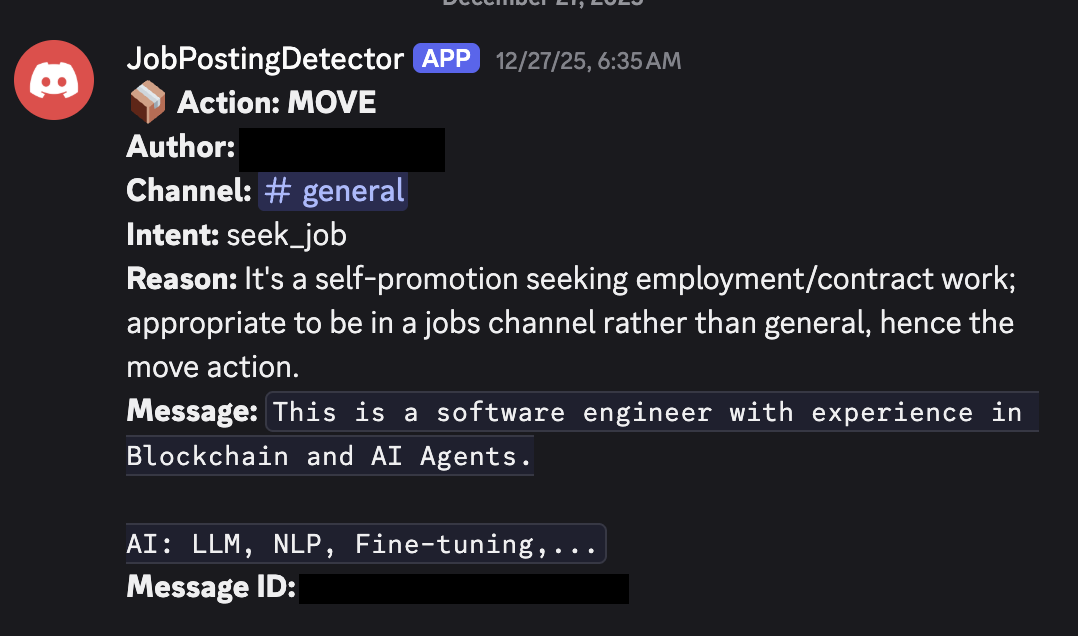
We also want to be notified as mods if there is an action taken, so that we can be aware if things start to break.
Designing around Detecting Primary Intent
Primary intent is a fuzzy line to draw. There are messages that have self-promotion in them, but the primary intent is not to promote. This line was chosen by talking to the team during the creation of this project.
For example:
Oh yeah I see why GEPA is cool. In my last job, I used MIPRO to improve our LLM-as-a-judge for insurance document relevance inside a chat by 20%, and my manager + our customers were very happy. Ultimately, I’m now looking for the next challenge and I’m excited about applying GEPA to whatever my next problem is (P.S. pls DM if you’d like to chat about hiring me!).
In this case, the primary intent of the message is to validate that they've used GEPA at a company, and share the project they worked on. Getting hired is secondary. As a team we talked about this, and it's about the primary intent, rather than the presence of anything hiring-related.
We will want to use the message, author, and the channel it was posted in. All of these could provide relevant information. If a user named dm_me_for_free_crypto sends a sketchy message, the LLM should take the username into account. Same with channel.
In #help-channel, if someone is struggling with a problem that requires a lot of extra help, it's totally fine for them to ask for help and offer compensation. It's only when someone posts exclusively in #help-channel saying they're looking for an AI engineer that we want to flag it.
It's because of this contextual nuance that things look a little fuzzy, rather than a pure message: str -> is_job_related: bool pipeline.
Or the simpler pipeline: if 'hiring' or 'job' in message: return True
Mapping our Problem to Task, Inputs, and Outputs
Our task, inputs, and outputs for the LLM start to look something like:
TASK:
Determine if a Discord message is either a job posting, looking for a job, or neither.

INPUTS:
- message: str
- metadata

OUTPUTS:
- internal_model_reasoning: str
- intent: POST, SEEK or NEITHER
- action: MOVE, FLAG, DELETE, ALLOW
- action_reason: str (user facing)
DSPy Makes the Code Remarkably Simple
Let's start to put that into a DSPy signature:
class JobPostingSignature(dspy.Signature):
    """Classify a Discord message and determine moderation action.

    A job posting or job seeking message will express the primary intent of introducing the user, their qualifications/openness to work, and their availability for hire, or availability to hire others"""

    message: str = dspy.InputField(desc="The Discord message content")
    author: str = dspy.InputField(desc="The message author's username")
    channel_name: str = dspy.InputField(desc="The channel where the message was posted")

    intent: Literal["post_job", "seek_job", "other"] = dspy.OutputField(
        desc="The user's intent: 'post_job' if offering a job, 'seek_job' if looking for work, 'other' for general discussion"
    )
    action: Literal["allow", "move", "flag", "delete"] = dspy.OutputField(
        desc="Action to take: 'allow' if appropriate for channel, 'move' if should be in jobs channel, 'flag' for manual review, 'delete' if spam/violation"
    )
    reason: str = dspy.OutputField(
        desc="Brief explanation of the classification and recommended action"
    )
Note that there are two reasoning fields. This is a design choice.
The first model reasoning happens when we call the signature with dspy.ChainOfThought(JobPostingSignature). This is to give the model time to deliberate. We are using gpt-5-nano with no reasoning built in, so this will explicitly give the model a chance to discuss the message if there is any nuance. This is similar to setting the model thinking parameter.
The second reasoning field is meant to be user/moderator facing. After the model has committed to a course of action, we want to show the user and us as the mods, "Why did you get banned?" which is different reasoning than the model's internal debate about what the intent of the message is.
DSPy does the LLM Plumbing for you
Part of why I use DSPy is that everything is built in already. Structured outputs, retries, plumbing between different LLMs and providers if I ever want to update, are all for free.
My code can be incredibly simple.
The module which takes in the signature above looks like:
class ClassifyJobPosting(dspy.Module):
    gateway = JobPostingGateway

    def __init__(self):
        super().__init__()
        self.classifier = dspy.ChainOfThought(JobPostingSignature)

    def forward(self, message: str, author: str, channel_name: str) -> dspy.Prediction:
        return self.classifier(message=message, author=author, channel_name=channel_name,)
It's important to note that I am not doing any prompt optimization here. I am just using DSPy for the LLM orchestration aspects. It's an incredibly concise tool to express your task that you want the LLM to solve without having to write large string prompts.
A Cronjob is Simpler Than Real-time Streaming
The most complex part is integrating with Discord and implementing the business logic for taking actions based on the LLM outputs.
There are two main ways that we can build this bot:
- Real-time streaming
- Running on a cronjob
We opt for (2) the cron approach. Mostly because the real-time streaming requires us to maintain a websocket connection. If the DSPy server was so popular that we had a large volume of messages, I might take on the higher complexity of building that. The DSPy server averages way less than 20 messages every 5 minutes.
The actual limit you want to set is the p99 number of messages per period, as long as it takes you less time to process the messages than the period.
Based on historical analysis of DSPy server traffic over the last 6 months, the p99 number of messages per 5 minutes is 11, so 20 messages is more than enough.
The other question we need to answer is: how long are we willing to wait for a job posting to be processed? If a job posting is live on the server for 5 minutes, no one cares. This constraint would be different for different servers, but these are the constraints of the problem I'm solving without overengineering.
The behavior will be as follows:
Every 5 minutes
- Gather the last 20 messages
- Skip any that have already been processed
- Classify as "move", "flag", "delete", or "allow"
- Take the relevant action for "move", "flag", "delete", and send an audit message into the
#moderator-onlychannel
- "move" moves the message into the
#jobschannel, and sends a message to the user - "flag" adds an emoji reaction and sends an audit message for the mods to review,
- "delete" deletes the message and sends a message to the user
- "allow" does nothing
To implement this, I use
dspy-clito handle the routing and scheduling.
Intro to dspy-cli
dspy-cli is a command line tool to help you create, scaffold, and deploy dspy applications. You can serve a dspy-cli created project by running dspy-cli serve, and it will bring up a local endpoint for you that you can test against. It is also what created our initial project directory structure.
There are a few different kinds of entry points you may want for any DSPy application. The two that dspy-cli currently supports are API-based and cron-based.
For this case, we want to gather a bunch of inputs every so often, and run batch inference over them, so CronGateway makes more sense. We will subclass it to implement the loading logic.
CronGateway Separates Data Loading From Action Taking
CronGateway is what you use when your trigger is periodic rather than based on a call.
CronGateway is an ABC with two core methods:
-
get_pipeline_inputs: Fetches your data and returns a list of input dictionaries for the pipeline to process. Each dict contains the kwargs for your module'sforward()method. You can also include a_metakey for data needed inon_completebut not by the pipeline itself (like message IDs or channel IDs). -
on_complete: Runs after each successful pipeline execution. This is where you take action based on the LLM's output. It receives both the original inputs (including_meta) and the pipeline output.
There's also an optional on_error method for handling failures.
JobPostingGateway
JobPostingGateway subclasses CronGateway. This is how you specify your data loading behavior. In our case, it loads the data and takes actions afterward.
Here's a simplified version of our gateway:
class JobPostingGateway(CronGateway):
    schedule = "*/5 * * * *"  # Every 5 minutes

    def setup(self) -> None:
        """Validate config and create Discord client."""
        self.client = DiscordClient(token=os.environ["DISCORD_BOT_TOKEN"])
        self.channel_ids = os.environ["DISCORD_CHANNEL_IDS"].split(",")

    async def get_pipeline_inputs(self) -> list[dict]:
        """Fetch recent messages from monitored channels."""
        inputs = []
        for channel_id in self.channel_ids:
            messages = await self.client.get_recent_messages(channel_id, limit=20)
            for msg in messages:
                if msg["author"].get("bot"):
                    continue
                inputs.append({
                    "message": msg["content"],
                    "author": msg["author"]["username"],
                    "channel_name": msg.get("channel_name", "unknown"),
                    "_meta": {
                        "message_id": msg["id"],
                        "channel_id": channel_id,
                        "author_id": msg["author"]["id"],
                    },
                })
        return inputs

    async def on_complete(self, inputs: dict, output: PipelineOutput) -> None:
        """Take moderation action based on classification result."""
        meta = inputs["_meta"]
        action = output.get("action", "allow")

        if action == "allow":
            return

        if action == "move":
            # Repost in jobs channel, delete original, DM user
            await self.client.send_message(
                self.jobs_channel_id,
                f"**Moved from <#{meta['channel_id']}>**\n{inputs['message']}",
            )
            await self.client.delete_message(meta["channel_id"], meta["message_id"])
            await self.client.send_dm(
                meta["author_id"],
                "Your job posting was moved to the jobs channel.",
            )

        elif action == "flag":
            await self.client.add_reaction(meta["channel_id"], meta["message_id"], "⚠️")

        elif action == "delete":
            await self.client.delete_message(meta["channel_id"], meta["message_id"])
            await self.client.send_dm(meta["author_id"], output.get("reason", ""))
Fly.io is a Great Match for dspy-cli Projects
When you create a dspy-cli project, there is a generated dockerfile that you can deploy onto any service that will run a Dockerfile for you. The Dockerfile will just install your project, dspy-cli, and then run dspy-cli serve .... That's all you need to get this service up and running. We have the option to include auth by default, but because there are not going to be incoming requests to our server, this is not relevant to the Cron style use cases.
We deploy this onto Fly.io. We want a single permanently running machine that triggers itself every 5 minutes.
You can trigger the first deploy using fly launch.
Turn Off Auto-Scaling for Internal Cron Jobs
Fly automatically scales your workload to 2 machines and will pause if there is not enough external traffic. For this deployment, there will by definition be 0 API-based traffic, so we need to turn off auto-scaling while keeping a minimum of one machine running.
Keep One Machine Running With auto_stop_machines = false
You can add a line to your fly.toml to get the pausing behavior we want:
auto_stop_machines = false
auto_start_machines = true
min_machines_running = 1
If our one machine goes down, we do want it to start another one. We don't want it to stop a machine because of no activity, so we turn off auto_stop_machines.
One Machine Avoids Deduplication Complexity
We also don't want more than one machine: (1) I don't want to pay for that, and (2) we haven't built in any deduplication mechanisms. If there are two machines running, they might both pick up the same messages.
You can set the number of machines to one and turn off ha (horizontal autoscaling).
fly scale count 1
fly deploy --ha=false
fly scale should remove one of the two default machines if you already ran fly launch. This was a bit finicky when I was setting it up, so you may also need to run fly machine kill to manually remove one.
Dry Run Mode is Your Dev Environment
"Production" is a loose word here because of the small scale, but this is deployed live, and actively affecting DSPy Discord users.
Because this is such a small project, there wasn't a great dev environment nor was it worth it to set up one. I sent messages into #general to test this. Before I enabled any actions that would actually remove messages, I set up a dry run mode that would analyze messages and send a dry run audit message into #moderator-only. I saw that it was correctly flagging the examples that I put in, and that was enough to turn off dry run mode.
One other consideration: while it would be annoying for people to get messages falsely moved for a case that isn't specified, it's not the end of the world. A fine developer workflow is to notice a new error case, adjust the bot, and redeploy. Any change does not need to be thoroughly tested, because the stakes are quite low so long as it doesn't delete the whole Discord server.
A Simple File Is Fine for Low-Stakes State
We create a file to store all of the IDs that we have processed. Fly mounts are not real databases, and this would be lost if the machine it is mounted on (not the machine running the bot) is killed. Losing this isn't a big deal because at most you're redoing 20 calls. If you were to expand this system, you'd want to make it more robust.
fly volumes create dspy_discord_data --size 1
Then inside fly.toml we add:
[mounts]
  source = "dspy_discord_data"
  destination = "/data"
Set Secrets With fly secrets set
Then we need to set the secrets.
You'll need a Discord bot token with access to read messages, send messages, and delete messages. You can get the bot token from this tutorial. To get the Channel ID, make sure your Discord client is in developer mode, then right click on the channel and select Copy Channel ID.
fly secrets set \
  DISCORD_BOT_TOKEN="<Your token>" \
  DISCORD_CHANNEL_IDS="<CHANNEL_1>, <CHANNEL_2>" \
  DISCORD_JOBS_CHANNEL_ID="<CHANNEL_ID>" \
  DISCORD_AUDIT_CHANNEL_ID="<CHANNEL_ID>" \
  OPENAI_API_KEY="<PASTE YOUR OPENAI KEY>"
You can set the DRY_RUN environment variable to true if you want to only send audit logs without taking actions, to verify it's working properly.
Conclusion
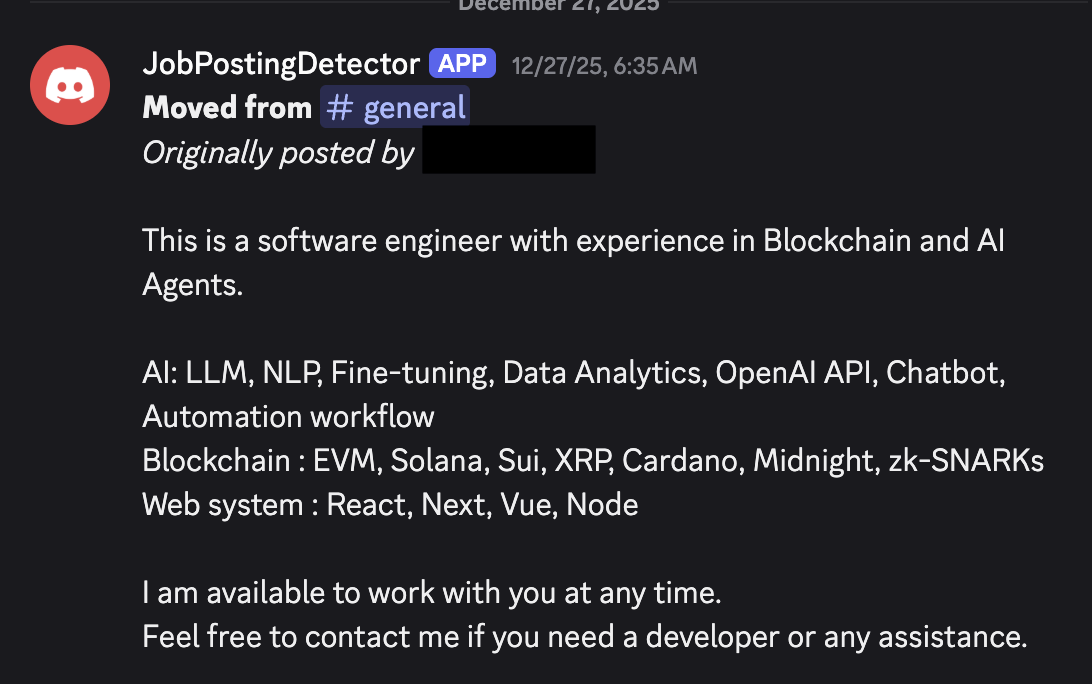
In Action: Moving a Message to #jobs
Here's what it looks like when the bot moves a message to #jobs:
And the audit log that gets sent to the moderator-only channel:
Learnings
Fly.io + dspy-cli Make Hobbyist Deployment Easy
Fly.io + dspy-cli make it REALLY easy to deploy hobbyist DSPy use cases. This was the first real problem I wanted to solve with it.
Figuring out how to have a single, permanently running machine on Fly did have its quirks. I spent 2-3 hours battling with killing machines. I feel good about where I arrived, but there might be better options for running a single, persistent lightweight VM.
Spending Time on the Signature Clarified Our Intent
I started by just writing out something random once I had established what I wanted to do. I also like to see what the different coding agents do when you ask them to write a DSPy signature. The common mistakes are including unnecessary descriptions for each field, or trying to parse out the answer from a single output field when you can just use DSPy's structured output capabilities.
I also got feedback from other people by just sending them the signature and asking if this describes the moderation ideology we want to have, which is how we arrived at the 'primary intent' framing.
The alignment of the team on the actual problem we are solving is incredibly important. We have all agreed on what the intended behavior of the system is, so we build towards that agreed upon goal.
As Edge Cases Arrive, Document Them In Your Evals
It initially thought some of the introductions that got posted in #general should stay. This was wrong! Immediately after I made this bot, there were some messages it did not move when it should have. It thought some scammy crypto job postings were actually people introducing themselves. As some people in the Discord pointed out (thanks @prashanth and @mchonedev), it's pretty obvious that anyone using the word "blockchain" in their post is likely not a legitimate user. DSPy is not a crypto server, and any thoughtful dev would hopefully know their audience. I added this into the evaluation framework.
We have two ways of getting feedback over time, aside from anything that I see in the channel myself!
- Audit logs from the bot in the
#moderator-onlychannel - People giving feedback in the
#server-feedbackchannel
Who knows what people will start to post in the discord! Part of deploying LLM based systems is that there are things that emerge over time that you need to adjust the system for.
Cost
LLM Inference + Fly.io Costs Under $1/Month
This is shockingly cheap to run! The LLM inference is not expensive (using gpt-5-nano), and the server costs <$1 per month (thank you Firecracker VMs + Fly.io). I'm happy to eat this cost to keep the server healthier and save myself the work I would have done otherwise.
The Blog Post Took Longer Than The Code
This bot did not take long to implement. I spent much longer writing this blog post than coding. Once I had the Discord token, it was easy for Amp to wire up the rest. I implemented the Gateway system for dspy-cli at the same time and took more care there because it is an important abstraction to get right.
Changes Deploy With a Single Command
If I want to make a change, all I need to do is update the signature, and run fly deploy to update my machine. All of the modules you write can be used with dspy-cli serve which means that you can still use the same VM.
Limitations
20 Messages Per 5 Minutes is all we need
By design, this will only work on 20 messages per 5 minutes. The limiting factor is LLM inference speed, and at some scale, rate limits imposed by the LLM provider, but not the runner's ability to manage requests.
I have run DSPy with up to 2048 parallel threads in a single process on my laptop (which only breaks because of threading ulimits). This can be fixed by running ulimit -u N where N is the number of threads you want to allow. Using async mode, which dspy-cli does by default, you get to ignore many of the overheads of managing thread-based concurrency.
As we discussed above, the p99 for the number of messages per 5 minutes is 11, so 20 messages is more than enough.
If I was going to scale this up to a server with a larger volume of messages, I would switch to using groq. The fast inference speed makes a huge difference when you need to process a lot of messages. You can easily change the number messages that are fetched and the number of parallel threads you want to use by setting use_batch to True for the CronGateway. Small models are good enough, and our task is easy enough such that with more intentional prompt optimization and evaluation, you could run a smaller model and expect similarly accurate results.
Prompt Injection Doesn't Matter Here
Someone might be able to sneak in a job posting via prompt injection.
In practice, this doesn't actually matter. People are good at tagging the mods if a message does sneak through.
The bot has no tool access, and it's not like the signature prompt is secret. There are no tools to access other messages, or ability to perform destructive actions towards other users.
Notably, I do not allow for any other messages in the thread context to be seen by the model. Showing full conversations would open up a lot of weird prompt injection avenues that I don't want to deal with.
Multi-Channel Spam Requires Deduplication
Processing a single message at a time means that we miss people who send a job posting in multiple channels.
Often what spammers do is drop a message into every channel in the server. Because each message is processed individually, we currently would take all of these and (without deduping) move them into #jobs.
I will add some very simple dedup behavior in a future update, but for now I am just going to leave it. The goal of this bot for now is to catch 80% of the simple cases.
If you want to join the DSPy Discord and see the bot in action, here's the invite: https://discord.gg/f5DJ778ZnK
The full source code is available on GitHub: https://github.com/cmpnd-ai/dspy-cli/tree/main/examples/discord-mod
If you have used DSPy or are thinking about using it, I'd love to chat! My username on the DSPy Discord is @Isaac. Feel free to email me at isaac@cmpnd.ai or DM me on Twitter/X @Isaacbmiller1.
Appendix
DSPy Signature to prompt example
If you are curious about how the DSPy signature gets turned into a prompt, it looks like the following.
The signature is:
class JobPostingSignature(dspy.Signature):
    """Classify a Discord message and determine moderation action.

    A job posting or job seeking message will express the primary intent of introducing the user, their qualifications/openness to work, and their availability for hire, or availability to hire others"""

    message: str = dspy.InputField(desc="The Discord message content")
    author: str = dspy.InputField(desc="The message author's username")
    channel_name: str = dspy.InputField(desc="The channel where the message was posted")

    intent: Literal["post_job", "seek_job", "other"] = dspy.OutputField(
        desc="The user's intent: 'post_job' if offering a job, 'seek_job' if looking for work, 'other' for general discussion"
    )
    action: Literal["allow", "move", "flag", "delete"] = dspy.OutputField(
        desc="Action to take: 'allow' if appropriate for channel, 'move' if should be in jobs channel, 'flag' for manual review, 'delete' if spam/violation"
    )
    reason: str = dspy.OutputField(
        desc="Brief explanation of the classification and recommended action"
    )
DSPy has a concept of an "adapter" which is a class that determines how a signature gets turned into a prompt, and also how the answers get extracted on the other end.
The rough outline for the adapters is:
System prompt:
1. Inputs
2. Outputs
3. Task

User prompt:
1. Field name: value for field, value in inputs
2. Desired assistant output list
The exact prompt that gets sent to the LLM for our signature above is:
System message:

Your input fields are:
1. `message` (str): The Discord message content
2. `author` (str): The message author's username
3. `channel_name` (str): The channel where the message was posted
Your output fields are:
1. `intent` (Literal['post_job', 'seek_job', 'other']): The user's intent: 'post_job' if offering a job, 'seek_job' if looking for work, 'other' for general discussion
2. `action` (Literal['allow', 'move', 'flag', 'delete']): Action to take: 'allow' if appropriate for channel, 'move' if should be in jobs channel, 'flag' for manual review, 'delete' if spam/violation
3. `reason` (str): Brief explanation of the classification and recommended action
All interactions will be structured in the following way, with the appropriate values filled in.

[[ ## message ## ]]
{message}

[[ ## author ## ]]
{author}

[[ ## channel_name ## ]]
{channel_name}

[[ ## intent ## ]]
{intent}        # note: the value you produce must exactly match (no extra characters) one of: post_job; seek_job; other

[[ ## action ## ]]
{action}        # note: the value you produce must exactly match (no extra characters) one of: allow; move; flag; delete

[[ ## reason ## ]]
{reason}

[[ ## completed ## ]]
In adhering to this structure, your objective is:
        Classify a Discord message and determine moderation action.

        A job posting or job seeking message will express the primary intent of introducing the user, their qualifications/openness to work, and their availability for hire, or availability to hire others

User message:

[[ ## message ## ]]
Hey everyone! I'm a senior Python developer with 5 years of experience looking for new opportunities. Open to remote work!

[[ ## author ## ]]
job_seeker_123

[[ ## channel_name ## ]]
general

Respond with the corresponding output fields, starting with the field `[[ ## intent ## ]]` (must be formatted as a valid Python Literal['post_job', 'seek_job', 'other']), then `[[ ## action ## ]]` (must be formatted as a valid Python Literal['allow', 'move', 'flag', 'delete']), then `[[ ## reason ## ]]`, and then ending with the marker for `[[ ## completed ## ]]`.
And the LM responds with:
[[ ## intent ## ]]
seek_job

[[ ## action ## ]]
move

[[ ## reason ## ]]
The message expresses the user's intent to seek job opportunities, which is more appropriate for a jobs channel rather than a general chat.

[[ ## completed ## ]]
Batch Processing
For higher throughput, CronGateway supports batch mode which processes all inputs in parallel using DSPy's module.batch():
class JobPostingGateway(CronGateway):
    schedule = "*/5 * * * *"
    use_batch = True      # Enable parallel processing
    num_threads = 4       # Number of concurrent threads (optional)
    max_errors = 10       # Stop batch if this many errors occur (optional)
With batch mode enabled, the scheduler will call your module's batch() method instead of running forward() sequentially. This is useful when you have many inputs and want to parallelize LLM calls. The on_complete callback still runs once per input after all batch results return.
Full fly.toml
app = 'discord-mod'
primary_region = 'ewr'

[build]

[http_service]
  internal_port = 8000
  force_https = true
  auto_stop_machines = false
  auto_start_machines = true
  min_machines_running = 1
  processes = ['app']

[[vm]]
  memory = '1gb'
  cpu_kind = 'shared'
  cpus = 1
  memory_mb = 1024

[mounts]
  source = "dspy_discord_data"
  destination = "/data"